StepStream
Publisher Description
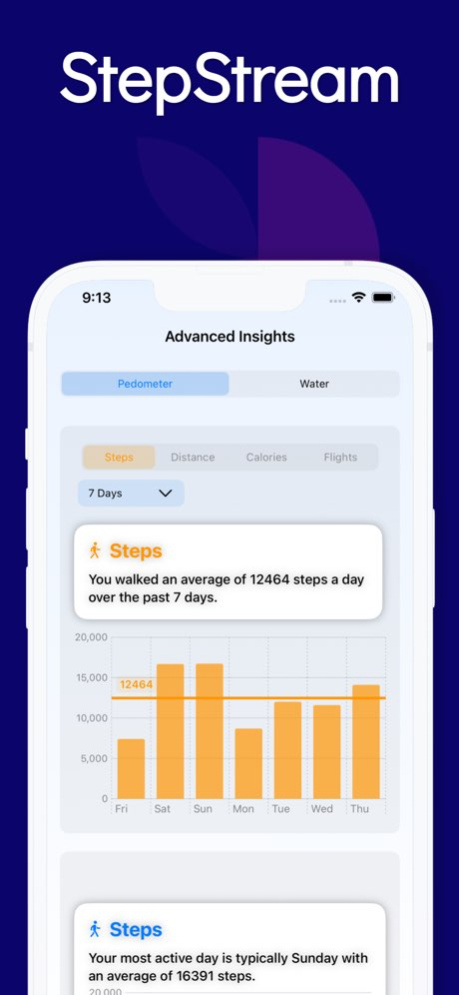


StepStream: Track, Achieve, and Play!
StepStream is your ultimate fitness and hydration companion, designed to help you stay on top of your health goals. Seamlessly integrated with Apple HealthKit, StepStream lets you track and report on key health metrics such as Steps, Calories Burned, Distance Walked, and Flights Climbed. Stay motivated with daily hydration tracking and reminders to help you meet your water intake goals.
Features at a Glance:
Step and Activity Tracking: Monitor your steps, calories, distance, and flights with detailed insights into your daily, weekly, and monthly progress.
Hydration Tracking: Log your water consumption throughout the day and receive timely reminders to keep you hydrated.
Daily Swordle Challenge: Hit your daily step or hydration goal, and unlock a fun Daily Swordle challenge - a Wordle-inspired game focused on steps, hydration, and healthy living.
Goal Setting: Set personal goals for both steps and water intake, and track your progress as you work towards healthier habits.
Unlock More with StepStream Pro:
Advanced Reporting & Insights: Get in-depth reports on your fitness and hydration data with advanced charts and statistics, empowering you to understand your health patterns and make informed decisions.
30+ Drink Templates: Log not just water but 30+ different beverages with our customizable drink templates, helping you track hydration more accurately.
Whether you're looking to get fit, stay hydrated, or simply challenge yourself with fun games, StepStream offers a unique blend of tracking and gameplay to keep you motivated every step of the way.
Why StepStream?
Seamless Apple HealthKit integration
Daily fitness and hydration reminders
Fun, motivational gameplay rewards when goals are met
Easy-to-use interface for tracking and reporting
Whether you're looking to increase your daily steps, improve your hydration, or simply develop healthier habits, StepStream makes it fun and easy to reach your wellness goals.
Stay active. Stay hydrated. And don’t forget to have fun with StepStream!
To get access to the StepStream Pro content and functionality, you can choose between a Monthly ($1.99/month) and Annual ($9.99/year) auto-renewable subscription. This is a recurring transaction that will be charged to your iTunes Account at confirmation of purchase and will automatically renew unless you cancel it at least 24 hours before the end of your subscription. Renewals will be charged at the same cost within 24 hours prior to the end of the current period. When cancelling a subscription, your subscription will stay active until the end of the period. You can manage your subscriptions and auto-renewal can be turned off by going to your iTunes Account Settings after purchase. Any unused portion of a free Weekly (7 day) trial period will be forfeited when a subscription is purchased.
Terms of Service: https://nigelware.weebly.com/terms-of-service.html
Privacy Policy: https://nigelware.weebly.com/privacy-policy1.html
End User License Agreement (EULA): https://www.apple.com/legal/internet-services/itunes/dev/stdeula/
About StepStream
The company that develops StepStream is Glen Bentley. The latest version released by its developer is 1.0 .
To install StepStream on your iOS device, just click the green Continue To App button above to start the installation process. The app is listed on our website since 2026-10-14 and was downloaded 0 times. We have already checked if the download link is safe, however for your own protection we recommend that you scan the downloaded app with your antivirus. Your antivirus may detect the StepStream as malware if the download link is broken.
How to install StepStream on your iOS device:
- Click on the Continue To App button on our website. This will redirect you to the App Store.
- Once the StepStream is shown in the iTunes listing of your iOS device, you can start its download and installation. Tap on the GET button to the right of the app to start downloading it.
- If you are not logged-in the iOS appstore app, you'll be prompted for your your Apple ID and/or password.
- After StepStream is downloaded, you'll see an INSTALL button to the right. Tap on it to start the actual installation of the iOS app.
- Once installation is finished you can tap on the OPEN button to start it. Its icon will also be added to your device home screen.
